
Moving QR Codes: How QR Code Labels for Moving Boxes Actually Work

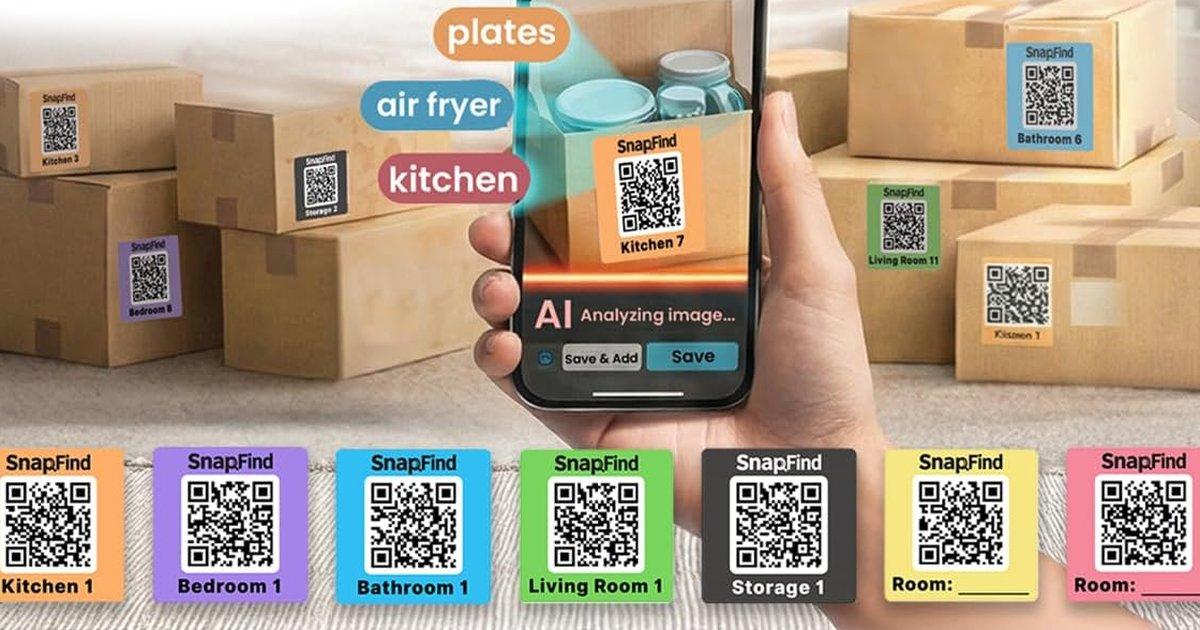
Moving QR codes solve the most annoying problem of any move: you know the coffee maker is in a box marked KITCHEN, and eleven boxes are marked KITCHEN.
A QR code label on each box, plus one photo of the contents when you seal it, turns a stack of identical brown boxes into something you can search. This guide covers how QR code moving labels work, when they are worth the extra 20 seconds a box, how room colors fit in, and a packing-day routine that keeps the whole thing simple.
How moving QR codes work
A QR code on a moving box does not store the contents. It is a name tag. Scan it and your phone opens the record for that one box: a photo of what is inside, a list of items, and the room it is going to.
That difference matters. A written list on the side of a box is finished the moment you tape it shut, and it is wrong the first time you repack. A record behind a code can be updated with one more photo.
In practice it works like this:
- Stick a label on the side of an empty box.
- Pack the box.
- Scan the code and take one photo of the open box before you seal it.
- On the other end, scan any box to see what is inside, or search for "coffee maker" and get "Kitchen 7."
With SnapFind's Moving mode, the AI names the items in the photo, so the record says "French press, kettle, mugs, tea tins" without any typing.
Are QR code labels for moving boxes worth it?
They are worth it when the cost of opening the wrong box is high. They add about 20 seconds a box, so an 80-box move costs roughly half an hour of photos, spent once.
Worth it for:
- Moves of 30 boxes or more. Past that size, nobody remembers what is where.
- Long-distance moves. Boxes arrive days later, and memory fades fast.
- Moves with a storage unit in between. You cannot casually open a box that is in a unit across town, but you can search it.
- Boxes headed for the garage or basement. These sit unopened for months, and they are the ones you will search for next year.
- Moves with helpers. Anyone you share the move with can search the boxes without texting you.
Probably overkill for: a studio apartment with 15 boxes you will unpack in one weekend. Use a marker and a box number.
Color-coded QR moving labels: the best of both
A QR code alone has one weakness. Nobody can read it from across a truck. That is why the best moving labels combine three things on one sticker: a room color, a room name with a number, and a QR code.
- The color tells movers and helpers where a box goes without reading anything.
- The room name and number ("Kitchen 7") make every box unique, so you can check that all of them arrived.
- The QR code tells you what is inside.
The SnapFind Moving Kit is built this way: 108 pre-printed, color-coded moving labels across seven rooms.
| Room | Labels in the kit | Label color |
|---|---|---|
| Kitchen | 24 | Orange |
| Bedroom | 24 | Purple |
| Bathroom | 12 | Blue |
| Living Room | 12 | Green |
| Storage | 12 | Black |
| Write-in room | 12 | Yellow |
| Write-in room | 12 | Pink |
The two write-in rooms cover whatever your house has that most do not: an office, a nursery, a workshop or the garage. You name them in the app on first use. Your first scan of a kit label also switches on Moving mode and adds 100 instant AI scans.
For a full comparison of numbers, colors and QR codes on their own, see how to label moving boxes.
A packing-day routine that actually holds up
The routine that works is the one you can repeat on box 60 when you are tired. Keep it to this:
- Label before you pack. Put the label on two adjacent sides, in the upper third, never on top. Stacked boxes hide anything on the lid.
- Pack one room at a time, in order of the numbers. Kitchen 1, Kitchen 2, Kitchen 3.
- Photograph from above, before you tape. One wide shot with everything visible is enough. Add a close-up only for things you will want to find fast: chargers, medications, documents, tools.
- Mark the open-tonight boxes. Sheets, the kettle, toilet paper, phone chargers. Load these last so they come off the truck first.
- Tape and stack. Done. The record is already saved.
If you repack a box later, take one more photo. That is the whole maintenance plan.
Moving day and unpacking
On moving day, the colors do the work. Tell helpers which color goes in which room and stick a matching label on each door at the new place. Nobody needs a phone.
On the other end, the QR codes take over:
- Search before you open anything. Need the HDMI cable? Search for it, get "Living Room 4," and open one box instead of five.
- Check that everything arrived. With every box numbered, a gap like a missing Kitchen 9 is easy to spot before the truck leaves.
- Unpack by priority, not by proximity. The open-tonight boxes first, then room by room.
When a box is unpacked, peel the kit label off and the box goes back to being a box.
After the move: the boxes that do not get unpacked
Every move has boxes that go straight to the garage, the basement or a storage unit and stay sealed for a year. These are the boxes where QR codes earn their keep, because nobody will remember what is in them.
The records stay searchable after the move. For containers you are keeping long term, swap the peel-off moving label for a permanent, waterproof one. Our guide to QR code labels for storage bins covers which labels hold up in a garage and where to put them.
Moving QR codes: DIY generator or a labeled kit?
You can make your own moving QR codes. Any free generator will turn a link into a code. Point each code at a shared photo album or a spreadsheet row, print them on label paper, and you have a working system for the cost of the labels.
The catch is that you are the database. Every box means opening the spreadsheet and typing what went in. By box 50, most people are typing "misc."
A kit that pairs with an inventory app skips that step: the photo is the list, and the AI does the typing. Whichever route you pick, check three things:
- Every code is unique. Two boxes with the same code are one record.
- The label shows a room and number you can read. A code alone does nothing for movers.
- You can export the data. You will spend a few hours building this inventory, and it should be yours.
Frequently asked questions
How do QR codes on moving boxes work?
Each box gets a label with a unique QR code. When you pack the box, you scan the code and take a photo of what is inside. Later you scan the box to see the photo, or search for an item by name and the app tells you which box it is in. The code holds nothing itself; it points at the record for that one box.
Are QR code labels for moving boxes worth it?
For most moves over about 30 boxes, yes. They add roughly 20 seconds per box at packing time and save you from opening boxes to find one thing. They are most useful for long-distance moves, moves with a storage unit in between, and boxes that will sit unopened in a garage or basement. For a studio with 15 boxes, a marker and a number are fine.
Do the movers need the app to use QR moving labels?
No. Movers read the room color and the room name printed on the label, so a Kitchen box goes to the kitchen without anyone scanning anything. The QR code is for you, at packing time and on the other end.
What if I run out of moving labels for one room?
Every SnapFind Moving Kit ships the same 108 labels, so a second kit repeats the same numbers. Instead, print extra labels with higher numbers from inside the SnapFind app: it generates a sheet that matches the kit labels, and you print it on any label paper.
Can I make my own moving QR codes?
Yes. A free QR code generator can make a code that opens a link, such as a shared photo album or a spreadsheet row for each box. It works, but you maintain the list by hand for every box. Pre-printed moving labels that pair with an inventory app skip that step: the photo you take at packing time becomes the list.
Do QR moving labels peel off after the move?
SnapFind Moving Kit labels are made to peel off cardboard when a box is unpacked, so the box can be reused or recycled. Boxes that are not getting unpacked, like the ones going straight to a storage unit, are better off with permanent QR storage labels.
Moving soon? Get the SnapFind Moving Kit, download the app, and photograph the first box you seal. Then search for it from the other side of the room.